The John W. Graham Library has computer workstations, technology help and photocopying, printing and scanning services available to staff, faculty and students.
Technology Loans
The John W. Graham Library lends accessories to current U of T students, faculty, and staff with a valid TCard for a short-term loan period of 3 hours. Overdue fines are $0.50 per hour. More information on fines can be found on our borrowing webpage.
- 2 Lightning USB-A cables
- 2 Lightning USB-C cables
- 2 USB-C cables
- 1 USB-A adapter
- 3 USB-C adapters
- 1 External DVD reader
Info about Computers:
Online or in the library at any computer.
Any of the Office stations: any seated computer on the ground floor. Computers are accessible to current faculty, staff and students.
Any of the Office stations: any seated computer on the ground floor. Computers are accessible to current faculty, staff, and students. To use Office 365, you must have a valid UTOR ID.
You can find real-time updates for computer availability across campus here.
The Graham Library has a flatbed scanner attached to the south most computer on the first floor. The photocopier can also scan to a USB. Currently, the KIC and Book2Net scanners are unavailable.
A valid UTORid and password are required to access the flatbed scanner. A USB is required to use the scanner embedded in the photocopier. There are instructions available online for the flatbed scanner.
Scanning is free.
From any seated computer in the library, or from your own laptop if connected wirelessly. Information about printing in the library can be found in the printing instructions.
The Graham Library no longer supports wired access. There are two wireless networks in the library:
- U of T: This network is for U of T Faculty, staff, and students. Before using this network, you need to register your UTORid by using the verify tool even if your UTORid is working for other services.
- Eduroam: This network is for members of other Eduroam affiliated institutions who wish to connect at U of T. You will need to configure the wireless using the information provided by your home institution.
Unfortunately, we are not able to provide internet access for any other users.
If you are a U of T student, faculty or staff member use the U of T network. If you are affiliated with another institution, you may be able to use the Eduroam network.
If you just need the catalogue, you can use the terminals upstairs, or the three standing terminals across from the Circulation Desk. The staff at the Circulation Desk should be able to make you a temporary login. It will allow you to sign on to the Graham Library computers for one day, but will not give you access to the wireless networks.
If you just need the catalogue, you can use the terminals upstairs, or the three standing terminals across from the Circulation Desk. If you are affiliated with another institution, you may be able to use the Eduroam network.
Info about Photocopying, Printing & Scanning
- The Graham Library has a photocopier on the ground floor in the alcove across from the Circulation Desk.
- Photocopying is $0.15/side. Duplexing (double-siding) is available, but there is no discount.
- Pay for photocopying using TCard+. Money can be added online, or in person at Robarts Library.
- We do not have guests passes for printing or photocopying. Cards are available at Robarts Library and at Gerstein Library for minimum purchase of $5.00 each. The card itself costs $0.75, so the card will come with a minimum of $4.25 balance for printing. The card is reloadable at the same libraries, and it is usable at the Graham Library.
- Copies are black & white only.
- The Graham Library has a flatbed scanner attached to the south most computer on the first floor. The photocopier can also scan to a USB. Currently, the KIC and Book2Net scanners are unavailable.
- A valid UTORid and password are required to access the flatbed scanner. A USB is required to use the scanner embedded in the photocopier. There are instructions available online for the flatbed scanner.
- Scanning is free.
Because of the extensive information on this page, we do NOT refund patrons who pay for a print job that is more/different than what they wanted.
- All computers in the Graham Library are connected to the printer in the alcove across from the Circulation Desk.
- You can also print
- Printing defaults to duplexed (double-sided) and black & white. Printing is $0.15/side for black & white, $0.50/side for colour.
- Pay for printing using TCard+. Money can be added online, or in person at Robarts Library.
- We do not have guests passes for printing. Cards are available at Robarts Library and at Gerstein Library for minimum purchase of $5.00 each. The card itself costs $0.75, so the card will come with a minimum of $4.25 balance for printing. The card is reloadable at the same libraries, and it is usable at the Graham Library.
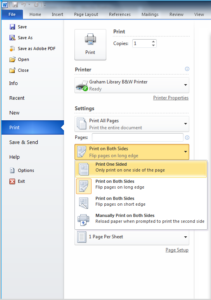
To print single-sided, you must change the setting at the computer as you’re sending the print job. Under settings, change “Print on Both Sides” to “Print One Sided”.
To print in colour, select the Graham Library Colour Printer. Pages with any colour cost $0.50/side, but pages that are entirely black & white will only cost $0.15/side.

To pay for and pick up a colour print job:
- Use your TCard to release it using the print-station computer.
- Your print job will print on the Graham Library Office printer. At the bottom of the print-station screen it will say “Job printed on GR-P2-colour. Command Successful.”
- Come to the Circulation Desk, and briefly describe the print job (e.g. it’s an essay; it’s 10 pages). A staff member will retrieve it for you.
Because of the extensive information on this page, we do NOT refund patrons who pay for a print job that is more/different than what they wanted.
- Print as you would at any computer (e.g. hit ctrl+P or select Print from the File menu). If you wish to print in colour or single -sided, select those options now.

- After clicking <OK>, a dialogue box will come up. Enter a name for your job.

- The next dialogue box to pop up will confirm the cost of printing your job, which printer it will ultimately go to, and how many pages of black & white/colour will be printed. It will also indicate if it is duplexed, but gives no indication if it is not. Here is a confirmation page for a job of two colour sheets, duplexed.
